

Two versions of a contract, an essay before and after feedback, a config file that stopped working: comparing by eye misses things. A diff shows every changed line in seconds.
How a line diff works
Diff programs look for the lines both files share, then report the rest as changes. The GNU manual describes this as finding sequences of common lines with groups of differing lines between them. The classic method is the longest common subsequence: the longest list of lines found in both versions in the same order.
Reading the result
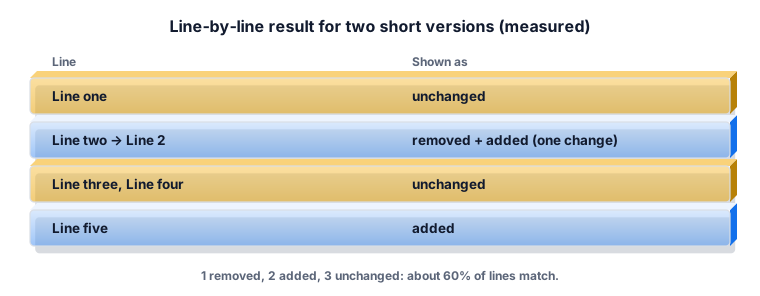
Red lines are only in the original, green lines only in the revised text, plain lines are in both. An edited line appears as a removed line and an added line next to each other, with the changed words highlighted.
The options
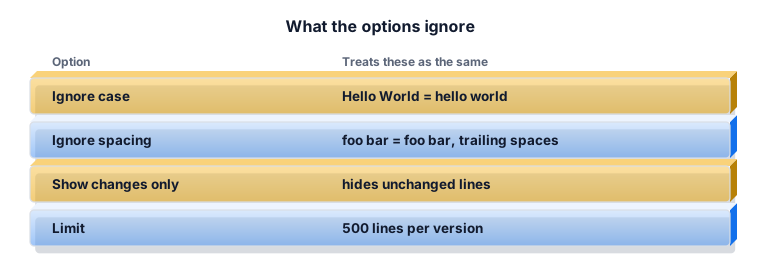
Ignore case treats Hello and hello as the same. Ignore spacing treats repeated spaces and trailing spaces as one space. Show changes only hides the unchanged lines for long texts.
Worked example 1: an edited paragraph
Paste a paragraph as one long line and the whole paragraph shows as changed even if one word moved. Put one sentence per line first; then only the changed sentence is marked.
Worked example 2: a list
A guest list of 40 names gets 2 new names and loses 1. The summary says 1 removed, 2 added, 39 unchanged; the match is 39 ÷ 41 ≈ 95%.
Worked example 3: code
A settings file looks identical but fails. Compare it with a working copy without Ignore spacing: a tab or trailing space shows up as a changed line.
What the ZYSNOR Text Compare does
- Line-by-line diff with word highlights inside changed lines.
- Up to 500 lines per version.
- Ignore case, ignore spacing, show changes only, swap versions, next change.
- Runs in your browser; nothing is uploaded.
Practice problems
Problem 1. Original 10 lines, revised 10 lines, 8 unchanged. Match?
Show the worked answer
8 ÷ 10 = 80%.
Problem 2. You moved line 2 to the end. How does it show?
Show the worked answer
As one removed line where it was and one added line at the end.
Ready to try it? The free tool works in your browser, and the button in the page header takes you straight to it.