

Text copied from a PDF or an old email often breaks at the end of every printed line. Pasted into a document or form, it looks ragged and does not reflow. Removing the line breaks fixes it.
Why copied text breaks
A PDF places each printed line separately, so copying gives a line break at the end of every line, not just at the end of each paragraph. Plain-text emails are often wrapped at about 70 to 80 characters for the same reason.
Keeping paragraphs
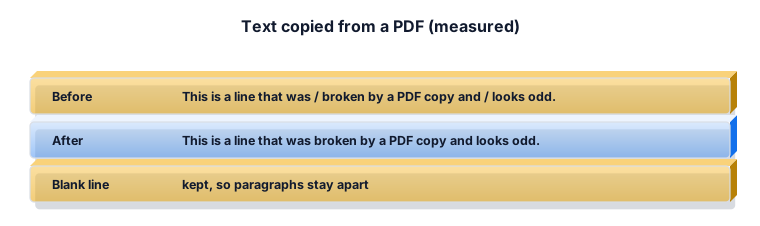
With Keep paragraphs on, a blank line marks a new paragraph and stays. Only the breaks inside each paragraph are joined. Turn it off to make one single block.
Hyphens at the end of a line
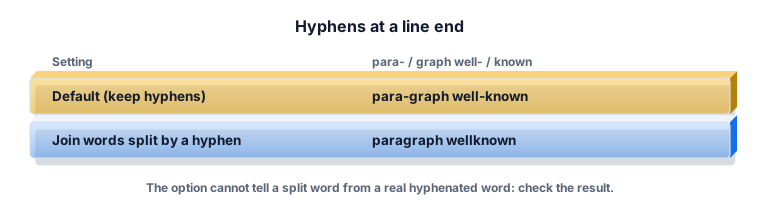
Printed text sometimes splits a word with a hyphen at the line end: "para-" then "graph". By default the hyphen is kept, because the tool cannot know whether it was a split or a real hyphen. The join option removes it, but it also turns "well-known" into "wellknown" when that word happened to break at the hyphen. Use it on text with many split words, then search for real compounds.
Worked example 1: a PDF paragraph
"This is a line that was / broken by a PDF copy and / looks odd." becomes "This is a line that was broken by a PDF copy and looks odd."
Worked example 2: a list to one line
A column of names copied from a spreadsheet, joined with a comma, becomes "apples, bananas, cherries", ready to paste into an email.
Worked example 3: text with double spaces
Tick Squeeze spaces to turn runs of spaces into one, which PDFs often leave behind.
What the ZYSNOR tool does
- Joiners: space, nothing, comma, semicolon or pipe.
- Keep paragraphs, join split words, squeeze spaces.
- Runs in your browser.
Practice problems
Problem 1. Two paragraphs of three lines each, Keep paragraphs on. How many lines are left?
Show the worked answer
Two lines with a blank line between them.
Problem 2. Should you tick Join split words for a list of hyphenated product codes?
Show the worked answer
No. It would delete hyphens that break at a line end.
Ready to try it? The free tool works in your browser, and the button in the page header takes you straight to it.