

Glossary · Photo, video and media
What is Resolution? HD, Full HD, 4K and 8K Explained with Pixel Counts
In simple words
Resolution is the number of pixels in an image or screen, written as width × height, for example 1920 × 1080. More pixels can show more detail, but the file is also bigger.
Resolution says how many pixels make up a picture. It does not say how sharp the picture looks on its own: lens quality, focus, compression and viewing distance all matter as well.
Common video resolutions
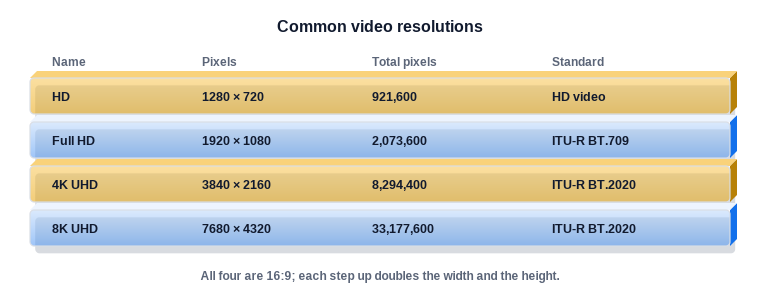
Full HD is defined for HDTV in ITU-R Recommendation BT.709, and 4K and 8K Ultra HD in BT.2020. "4K" in cinema (DCI 4K, 4096 × 2160) is slightly wider than 4K UHD television.
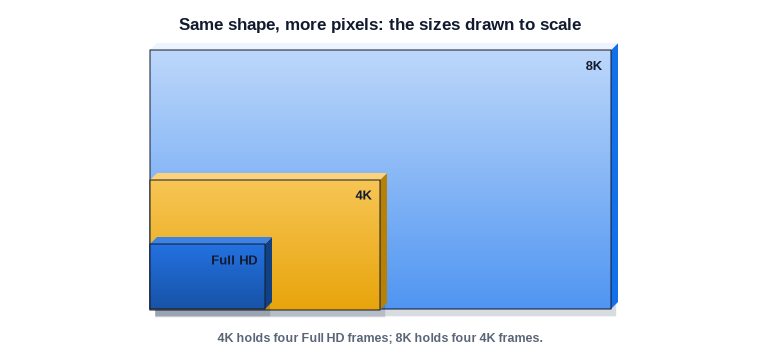
Worked example: comparing pixel counts
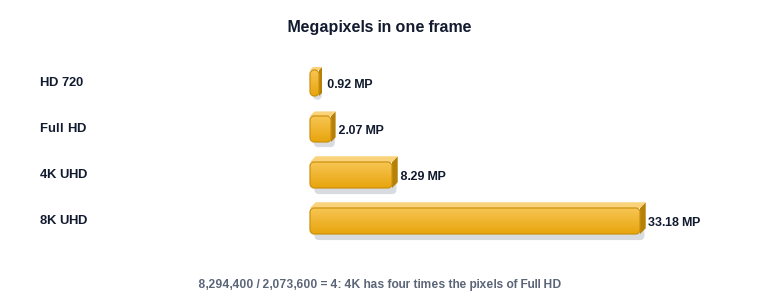
- Full HD: 1920 × 1080 = 2,073,600 pixels (about 2.1 megapixels)
- 4K UHD: 3840 × 2160 = 8,294,400 pixels (about 8.3 megapixels)
- 8,294,400 ÷ 2,073,600 = 4, because both the width and the height double: 2 × 2 = 4
- 8K UHD: 7680 × 4320 = 33,177,600 pixels, again 4 times 4K and 16 times Full HD
Resolution and print
For printing, resolution is often given as pixels per inch (PPI): how many image pixels fit in one inch of the page. A 3840-pixel-wide 4K frame printed at 300 PPI is 3840 / 300 = 12.8 inches (32.5 cm) wide.
Resolution, file size and aspect ratio
- File size depends on resolution, but also on compression and format: a 4K photo can be a small file if it is heavily compressed.
- Aspect ratio is the shape (16:9, 4:3); resolution is the number of pixels. 1280 × 720 and 3840 × 2160 have the same shape but very different resolutions.
Step by step: choosing a resolution
- Start from where the image or video will be shown: a website, a phone, a TV or a print.
- Match the display size; extra pixels beyond it add file size without visible gain.
- Keep a full-resolution original, and export smaller copies for each use.
- Resize first, then compress to meet upload limits.
Common mistakes
- Confusing resolution with file size.
- Confusing resolution with aspect ratio.
- Enlarging a small image and expecting more detail.
- Uploading huge originals to a website, which slows pages for no visible gain.
Related terms
- Photo, video and mediaGlossary term
Pixel
A pixel (short for "picture element") is the smallest dot of colour in a digital image or on a screen. Images are grids of millions of pixels; the more pixels, the more detail the image can hold.1 min read · Added 20 Nov 2026 - Photo, video and mediaGlossary term
Aspect ratio
Aspect ratio is the relationship between the width and the height of an image, screen or video, written as two numbers such as 16:9 or 1:1. It describes the shape, not the size: a small and a large 16:9 image have the same shape.2 min read · Added 20 Nov 2026
Frequently asked questions
Is 4K the same as 3840 × 2160?
For TV and most video, "4K" means 4K UHD, 3840 × 2160. Cinema 4K (DCI) is slightly wider.
Does higher resolution always mean better quality?
Not always. Lens, lighting, compression and the screen also matter.