

Glossary · CAD and BIM
What is an Xref in AutoCAD? Meaning, Attach vs Overlay, Example
In simple words
An xref (external reference) is another drawing file linked into the current AutoCAD drawing. It is displayed but not copied in, so when the source drawing changes, the xref updates when the drawing is reopened or the xref is reloaded.
Xrefs let several people work on one project at the same time: the architect keeps the floor plan, and the structural, electrical and plumbing drawings all show it as a live background.
How it works
An xref is stored as a path to another DWG file, not as copied geometry. AutoCAD reads that file each time the host drawing opens, or when you reload it, so the host always shows the latest saved version. Xrefs are managed in the External References palette (the XREF command), where they can be attached, reloaded, unloaded, detached or bound.
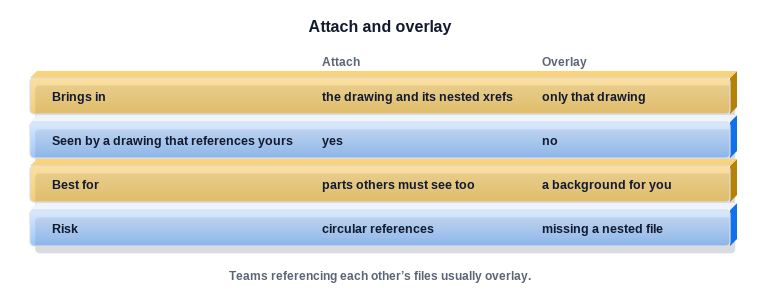
Attach or overlay
Path types
The path to an xref can be full (the whole folder path), relative (from the host drawing's folder) or no path (AutoCAD searches the host folder and support paths). Relative paths keep working when a whole project folder is moved or sent to someone else; full paths break as soon as the drive or folder name changes.
Working with an xref
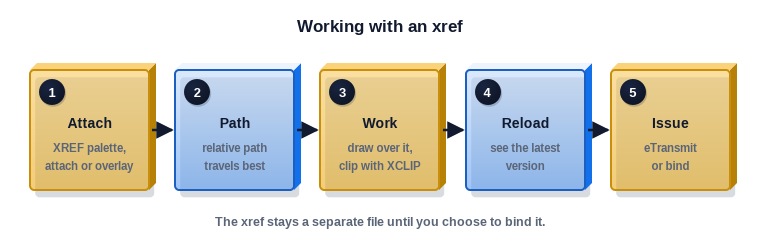
- Open the XREF palette and attach (or overlay) the DWG at 0,0,0 with scale 1, if both drawings share the same origin.
- Choose a relative path.
- Draw over it on your own layers; use XCLIP to show only the part you need.
- Reload when the other team saves changes; the palette flags xrefs that need reloading.
- To issue, send the drawing with its xrefs using eTransmit, or bind the xrefs if the receiver needs a single file.
Worked example: edits after one change
The base floor plan appears in five drawings (structural, electrical, plumbing, HVAC and fire). The architect moves one wall.
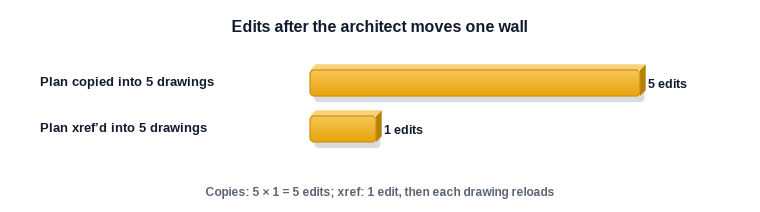
- Plan copied into each drawing: 5 drawings × 1 edit = 5 edits, and five chances to miss one.
- Plan attached as an xref: 1 edit in the plan file, then each of the 5 drawings shows it after reloading.
Bind and insert
Binding turns an xref into a block inside the host, so it stops updating. "Bind" keeps the xref's layer names with a prefix (for example PLAN$0$A-WALL); "Insert" merges them into the host's own layers.
Common mistakes
- Sending a drawing without its xref files, so they show as "Not Found".
- Full paths that break on another computer; use relative paths.
- Editing the xref inside the host (REFEDIT) without telling the file's owner.
- Attaching drawings that reference each other, causing circular references; overlay instead.
- Binding too early, so the drawing no longer updates when the base plan changes.
Related terms
- CAD and BIMGlossary term
DWG file
DWG is the native drawing file format of AutoCAD. It stores 2D and 3D geometry, layers, blocks, text, dimensions, layouts and drawing information. It is owned by Autodesk and is one of the most widely used formats for sharing CAD drawings.1 min read · Added 20 Nov 2026 - CAD and BIMGlossary term
Block (AutoCAD)
A block in AutoCAD is one or more objects combined into one named object, such as a door or a title block. The definition is stored once; every copy you place points to it, so editing the definition updates all copies.2 min read · Added 20 Nov 2026 - CAD and BIMGlossary term
Layer (AutoCAD)
A layer in AutoCAD is a named group for objects of the same kind, such as walls, doors or text. Each layer sets default colour, linetype and lineweight, and can be turned off, frozen or locked.2 min read · Added 20 Nov 2026 - CAD and BIMGlossary term
Model space and paper space
In AutoCAD, model space is where you draw the real object at full size (1:1). Paper space is the sheet layout, with a title block and viewports that show scaled views of the model for printing.2 min read · Added 20 Nov 2026
Frequently asked questions
How do I manage xrefs?
With the XREF command (External References palette): attach, reload, detach, bind.
What does Bind do?
It turns the xref into a block inside the drawing, so it no longer updates.