

Many forms and contracts now arrive as PDFs and ask for your signature. Printing, signing and scanning works, but a signature image you can place on any document is faster. This guide shows the three ways to make one, how to place it, how to keep it safe, and what it legally is and is not.
Three ways to make it
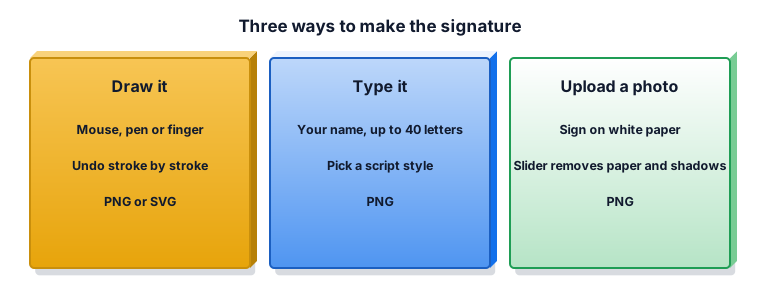
Draw it with a mouse, a pen or your finger; Undo removes the last stroke. Type it: your name in a script style, up to 40 letters. Upload a photo of your real signature on white paper; a slider removes the paper and shadows so only the ink is left. Drawing on a phone or tablet and the photo method give the most natural result.
Transparent PNG or SVG
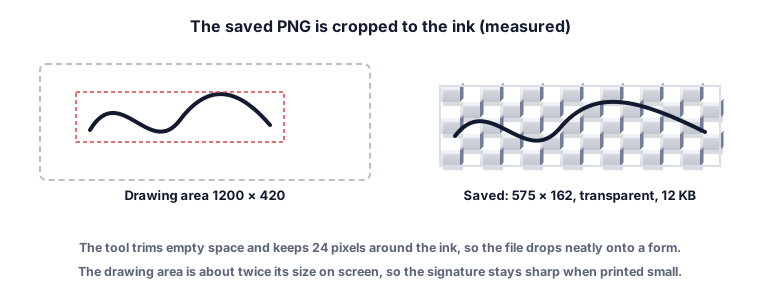
A transparent PNG has no background, so the signature sits on the signature line without a white box. Our drawn signature saved as a 575 × 162 pixel PNG of 12 KB, cropped to the ink with 24 pixels around it. A drawn signature can also be saved as SVG, a vector file that stays sharp at any size and was under 1 KB. Choose a white background only if the place you upload to does not accept transparency.
What an image signature legally is
The EU's eIDAS rules define three levels of electronic signature: simple, advanced and qualified, with the qualified level meeting the most requirements. Even writing your name under an email can count as a simple electronic signature. A pasted signature image is a simple electronic signature. A qualified signature is an advanced signature made with a qualified signature creation device and based on a qualified certificate, which an image cannot provide. Many everyday forms accept a signature image; some contracts, government filings and banks require more. If unsure, ask the party that requests your signature.
Worked example 1: sign a PDF
Download the transparent PNG, open the PDF in Edit PDF, choose Add image, place the signature on the line and resize it with the corner. Save a new copy.
Worked example 2: sign a Word document
Insert the PNG as a picture, set it to "in front of text", and move it onto the line. Because the background is transparent, the line shows through.
Worked example 3: a scanned real signature
Sign on plain white paper with a dark pen, photograph it in good light, choose Upload a photo and move the slider until the paper and shadow disappear but the ink stays solid. Pick Blue ink if the original was blue.
Worked example 4: a signature for an email footer
Type it or draw it, choose a white background if your email program does not show transparency well, and keep the image small (about 300 pixels wide).
Worked example 5: the wrong colour
You drew in black but the form wants blue. Change the ink colour: the whole signature is recoloured, so you do not need to draw it again.
Keep it private
Anyone with the file can paste your signature anywhere. Do not post it publicly, do not email it to people who do not need it, and prefer placing it into the PDF yourself over sending the image. The ZYSNOR tool keeps the drawing in your browser until you download it.
What the ZYSNOR Signature Maker does
- Modes: draw, type (up to 40 letters, several script styles) or upload a photo (JPG, PNG or WebP) with a paper-removal slider.
- Options: ink black, blue, green or red; pen fine, medium or bold; transparent or white background.
- Output: PNG cropped to the ink with a 24-pixel margin; SVG for drawn signatures.
- Made in your browser; nothing is uploaded.
Mistakes that waste time
- Drawing fast with a mouse. Draw slowly and large, or use a phone.
- A photo in poor light. Shadows look like ink; use daylight and white paper.
- Treating an image as a certified e-signature. See section 3.
Words you may meet
- Simple electronic signature: any electronic sign of agreement, including a signature image.
- Qualified electronic signature: a certificate-based signature made with a special device, with the strongest legal status in the EU.
- Transparent PNG: an image with no background.
- SVG: a vector image that stays sharp at any size.
Practice problems
Problem 1. Your signature should sit on a grey line in a PDF. Transparent or white background?
Show the worked answer
Transparent, so the line shows through.
Problem 2. The ink in the drawing spans 527 × 114 pixels. How big is the saved PNG?
Show the worked answer
Add 24 on each side: 527 + 48 = 575 wide and 114 + 48 = 162 high.
Problem 3. A bank asks for a qualified electronic signature. Is a signature image enough?
Show the worked answer
No. A qualified signature needs a qualified certificate and signature device from a trust service provider.
Ready to make yours? The free Signature Maker works in your browser, and the button in the page header takes you straight to it.