

Flashcards are one of the oldest study tools, and one of the easiest to use badly. Reading through a stack of cards and nodding at each answer feels like studying but is closer to rereading. This guide explains what the research says, how to write cards you can actually test yourself with, and how to use the ZYSNOR Flashcard Maker.
Why flashcards work: testing yourself
A flashcard asks you to pull an answer out of memory. Psychologists call this practice testing or retrieval practice. A 2013 review of ten study techniques by Dunlosky and colleagues rated two of them highest: practice testing and distributed practice. The press summary of the report points out that most students will know practice testing from using flash cards or answering the questions at the end of a textbook chapter. In the same review, popular methods such as highlighting and rereading did not show much promise.
The testing effect itself was shown in a classic study. Roediger and Karpicke (2006) had students either take recall tests on a passage or restudy it. On a test five minutes later, restudying did better. On tests two days and one week later, the students who had been tested remembered substantially more, even though restudying had made students more confident that they would remember. The authors' conclusion was that testing is a powerful means of improving learning, not just assessing it.
That is the whole case for flashcards: they are a quick way to test yourself. They only work if you really try to answer first.
Writing a good card
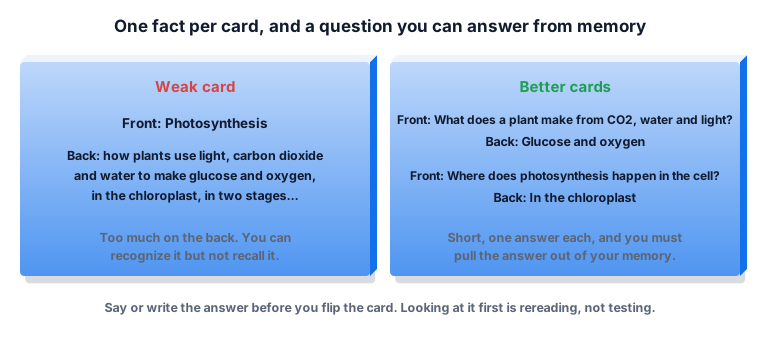
- One fact per card. If the back is a paragraph, split it into several cards.
- Ask a question you can answer. "What does a plant make from carbon dioxide, water and light?" is better than the single word "Photosynthesis", because it tells you what to recall.
- Keep the answer short. A word, a number, a short phrase or a short formula.
- Use your own words. A card you wrote after reading a topic is more useful than a copied line you did not understand.
- Add a hint only if you need it. A small clue such as "(biology)" is enough; do not put the answer in the question.
These are practical rules rather than research findings, but they follow from the idea above: a card works when it makes you retrieve something specific.
Spacing: when to come back to a card
The other technique rated highest in the 2013 review, distributed practice, means spreading your study over time instead of doing it all at once. The review reports that spreading out your studying and quizzing yourself on material before the exam are both highly effective. Cramming a whole deck the night before gives you the short-term gain seen in the five-minute test above, and less of the lasting one.
A simple habit: go through your deck for ten minutes a day over several days rather than for an hour once. Cards you miss should come back more often than cards you know.
The Leitner box method
The German science journalist Sebastian Leitner proposed a way to do this with paper cards in 1972. It is a simple version of spaced repetition: you sort cards into boxes by how well you know them, and review the boxes at increasing intervals. Descriptions of the method agree that new cards start in the first box and move up a box each time you get them right, so the cards you know come back less often.
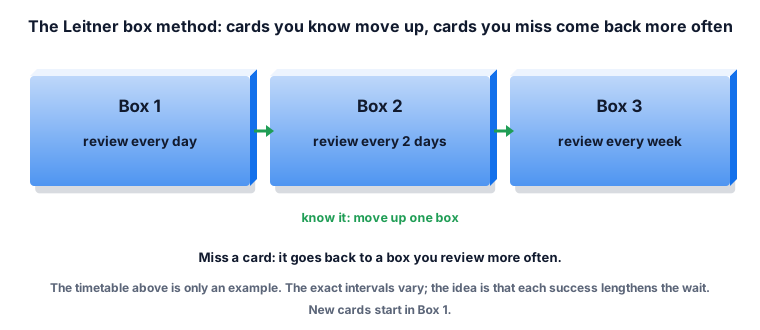
The ZYSNOR Flashcard Maker does not keep your cards between visits or schedule reviews for you, so it is not a full Leitner system. You can use it to make the deck, run a study round, and keep the exported CSV file for your own boxes or spreadsheet.
Making a deck in the ZYSNOR Flashcard Maker
Type or paste one pair per line. The tool accepts five separators between the term and the definition.
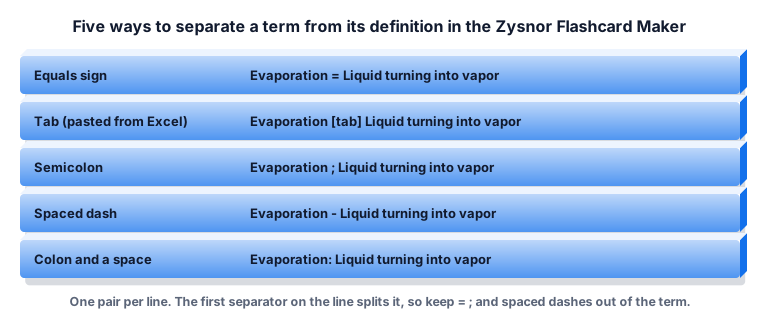
A tab is what you get when you copy two columns from Excel or a spreadsheet, so a list built there pastes straight in. You can have up to 500 cards at a time.
The first separator on a line splits it. We tested this: "Hello; world = greeting" makes a card with the front "Hello" and the back "world = greeting", and "2 - 1 = 1" makes the front "2". If your term contains one of these separators, rewrite the line or use a tab.
Studying with the tool
After Make flashcards, each card is shown as its term. Select a card to reveal the definition. Shuffle changes the order. Study mode shows one card at a time in random order: select the card or press the space bar to flip it, then press 1 for "I know it" or 2 for "Still learning".
Worked example. A deck of 30 cards. In round one you mark 21 as known and 9 as still learning. The tool reports: Round complete: 21 known, 9 to review (70% known). Selecting Review the 9 missed starts a second round with only those nine cards. If you now know 7 of them, the tool reports 7 known, 2 to review (78% known), and you can review the last two. The percentage is the known cards divided by the cards in that round, rounded.
Then use Download cards as CSV to keep the deck. The file has two columns, term and definition, and opens in Excel or Google Sheets.
A one-week plan
- Day 1: make the deck right after the lesson, while it is fresh. Do one study round.
- Day 2: one round, focusing on the cards you missed the day before.
- Day 4: one round of the whole deck.
- Day 7: one round again. Cards you still miss get rewritten as a clearer question, or split in two.
The days are an example, not a rule from a study. What matters is that you come back, and that the cards you miss come back sooner.
What the Flashcard Maker does not do
- It does not save your deck. If you close the page, paste the list again (or keep the CSV).
- It does not schedule reviews over days. Spacing is up to you.
- Cards are text only: no images, audio or formatting. A card cannot have a line break in it.
- It makes cards one way, term to definition. To test the other direction, swap the columns and make a second deck.
Mistakes to avoid
- Flipping before you try. Looking at the answer first turns testing into rereading.
- Cards that are too big. A paragraph on the back means you will recognize it, not recall it.
- Doing the whole deck once, the night before. Short sessions over several days work better.
- Only studying the cards you know. The missed cards are the ones to repeat.
- Memorizing without understanding. Cards help you remember facts; they do not replace working through problems.
Short glossary
- Practice testing: trying to recall an answer from memory, for example with a flashcard.
- Distributed practice: spreading study over time instead of doing it in one block.
- Spaced repetition: reviewing material at increasing intervals.
- Leitner system: a box method for spaced repetition with flashcards.