

A blank page at the end, a cover sheet you do not want to send, three pages with private notes: removing pages is one of the most common PDF jobs. This guide shows how to name the pages, what you will get, how page numbers shift afterwards, and what deleting a page does not do.
What removing pages does
The tool makes a new PDF that contains every page except the ones you name. The pages that stay keep their order and their quality, because they are copied, not redrawn. The new file starts again at page 1. Your original file is not touched, so if you removed the wrong page you can start again from it. Desktop programs behave differently here: in Adobe Acrobat the deletion is made in the open file and Adobe notes it cannot be undone after saving, so keep a copy of the original there.
How to name the pages
Type numbers, ranges and words, separated by commas. 3 is page 3. 3-5 is pages 3, 4 and 5. odd and even mean all odd or all even pages. last is the last page, so 2-last is everything from page 2 to the end. The list works like the one in Split PDF, because both tools use the same list reader. A page you name twice is removed once, and the order you type does not matter.
Page numbers shift
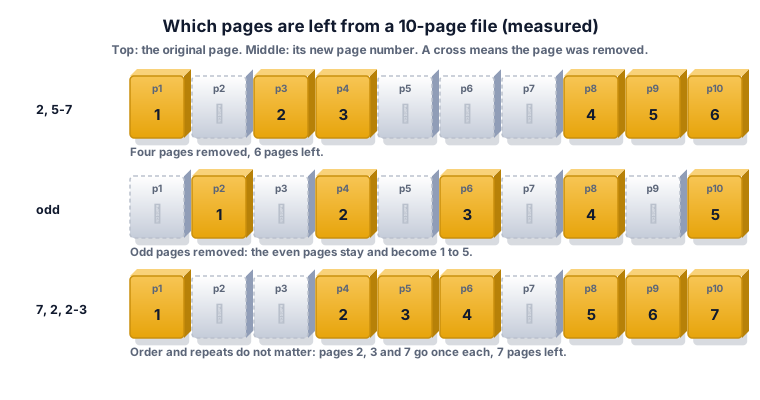
This is the point that causes most mistakes. After removing page 2, the old page 3 is the new page 2. So when you remove pages in two rounds, the second list must use the numbers of the new file. The safest habit is to remove everything in one list, using the numbers of the original file.
Worked example 1: a blank last page
A 12-page export has a blank page 12. Type last. The tool removes page 12 and leaves 11 pages. This works even if you do not know how many pages the file has.
Worked example 2: a cover sheet and a notes page
You are sending pages 2 to 9 of a 10-page file, without the cover (page 1) and without the page of notes (page 10). Type 1, 10 or 1, last. Eight pages remain, numbered 1 to 8.
Worked example 3: odd pages
A scanner put a blank back side after every front page of a 10-page file. The blanks are the even pages, so type even. The tool removes pages 2, 4, 6, 8 and 10 and leaves the five front pages as pages 1 to 5. If the blanks were the odd pages (the stack was fed the other way round), type odd instead. Look at pages 1 and 2 first, so you pick the right word.
Worked example 4: a messy list
You type 7, 2, 2-3 on a 10-page file. Pages 2 and 3 are named by 2-3, and page 2 is named again alone, but each page is counted once. The tool removes pages 2, 3 and 7 and leaves 7 pages, which we measured. Typing the pages out of order did not matter.
Worked example 5: removing everything
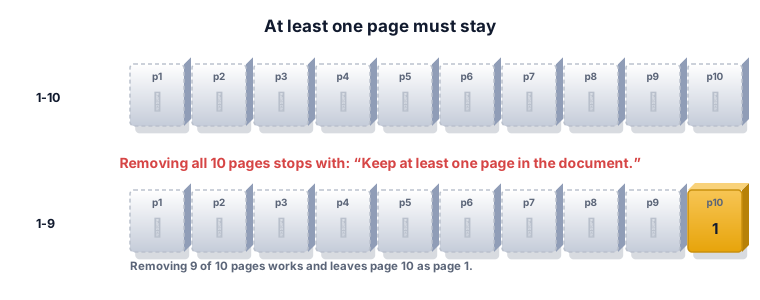
If you type 1-10 on a 10-page file, nothing is saved and the tool says "Keep at least one page in the document." A PDF with no pages is not a usable file, and Adobe Acrobat has the same rule. Removing 9 of the 10 pages works: page 10 becomes the only page.
Remove or extract?
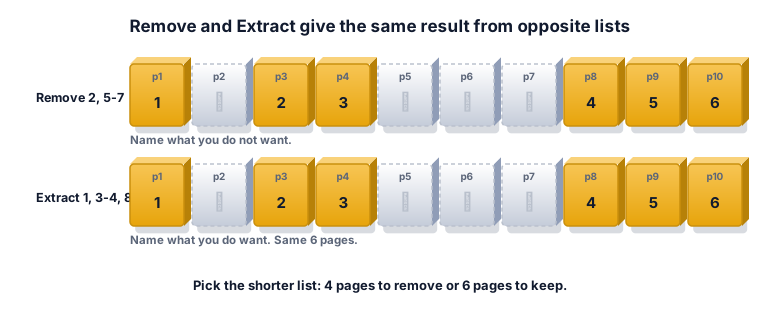
Both give the same kind of result. Remove lists the pages you do not want; Extract lists the pages you do want. To drop 4 pages from a 10-page file, the short list is the pages to remove. To keep 2 pages from a 100-page file, the short list is the pages to keep, so extract. Pick whichever list is shorter and you are less likely to mistype.
What deleting a page does not do
Removing a page is not a security tool. In our test the text of the removed pages was no longer in the saved file, but that was a simple file. Adobe lists deleted or cropped content, hidden layers, comments and metadata as places where sensitive data can stay in a PDF, and a security note from the Eclectic Light Company says to assume anything removed from view may still be in the file unless a proper redaction tool was used. If the pages hold secrets, do not rely on deleting alone: open the result, search for the sensitive words, and use a redaction tool for anything that must not leak.
What the ZYSNOR Remove PDF Pages tool does
The tool runs in your browser, so the file is not uploaded. The PDF engine is loaded when you open the page, so you need an internet connection to start; after that the file is processed on your device.
- Page list: numbers, ranges, odd, even and last, separated by commas.
- Error messages: "Use page numbers from 1 to N." if a number is too big, and "Keep at least one page in the document." if the list covers every page.
- Limits: the PDF must not be password-protected, and up to 20 files or 100 MB in total are accepted per run.
- Your original file is never changed; you download a new copy.
Mistakes that waste time
- Using the page number printed on the page. A report may print "1" on PDF page 3. The tool counts PDF pages, not printed numbers. Check the page number in your PDF viewer.
- Removing in two rounds. After the first round the numbers have moved. Use one list on the original.
- Mixing up odd and even. Open the first two pages and see which are blank.
- Not checking the result. Open the new file and look at the page count and the first page after each gap.
- Trusting delete as redaction. See section 10.
Other ways to do it
- Adobe Acrobat: open Organize Pages, select the thumbnails, press Delete, confirm and save. Adobe notes it cannot be undone after saving.
- Your system's PDF viewer often lets you select thumbnails and press Delete. Check whether it changes the open file or a copy.
- ZYSNOR: free, no sign-up, a separate copy is saved, and the file stays on your device.
Words you may meet
- Page range: two numbers joined by a dash, such as 5-7, meaning pages 5 to 7.
- Extract: keep chosen pages in a new file.
- Redaction: permanent removal of sensitive content from the file itself, not only from the view.
- Thumbnail: a small picture of a page in the side panel of a viewer.
Check your answer in 10 seconds
- Is the page count equal to the original minus the pages you named?
- Is the first page after each removed block the one you expected?
- Did you remove by PDF page number, not the printed number?
Practice problems
Problem 1. A 20-page file, you type 1-3, 18-last. How many pages are left?
Show the worked answer
1-3 is 3 pages; 18-last is pages 18, 19 and 20, which is 3 pages. 20 − 6 = 14 pages, the old pages 4 to 17.
Problem 2. A 9-page file, you type even. Which pages go and how many stay?
Show the worked answer
Even pages are 2, 4, 6 and 8: 4 pages. 9 − 4 = 5 pages stay (old pages 1, 3, 5, 7, 9, now pages 1 to 5).
Problem 3. After removing page 2 from a 6-page file, you want to remove what was page 5 as well. What number do you type for the new file?
Show the worked answer
The old page 5 is now page 4, because one page before it was removed. Type 4. It is simpler to remove 2 and 5 together from the original.
Ready to try it on your own file? The free Remove PDF Pages tool does the work in your browser, and the button in the page header takes you straight to it.