ZYSNOR, smart solutions, real impact
Text to Speech

Writing guide

How to use text to speech

By , Founder of ZYSNOR · Updated · Checked · 7 min read

In short

Paste your text, choose a voice and a speed, and press Read aloud. The voices come from your device and browser, so each device offers its own set; some run on the device and some use an online service. Speed runs from 0.5 to 2. Long text is read in short pieces so the browser does not stop halfway.

Jump to a section

Hearing your own writing is one of the best ways to find missing words and clumsy sentences. Text to speech also helps with long articles, tired eyes and language learning.

Where the voices come from

Browsers do not ship one standard voice. The list comes from the operating system and browser, so a Windows laptop, an iPhone and an Android phone each show different voices. Some voices are installed on the device and some are online voices that the browser fetches. To get more voices, add language or voice packs in your device settings.

Speed, pitch and styles

Speed 1 is normal; 0.8 is slower and clearer, 1.5 is fast listening. Pitch changes how high the voice sounds. The styles fill both: Normal 1/1, Slow and clear 0.8/1, Calm 0.9/0.85, Lively 1.15/1.2.
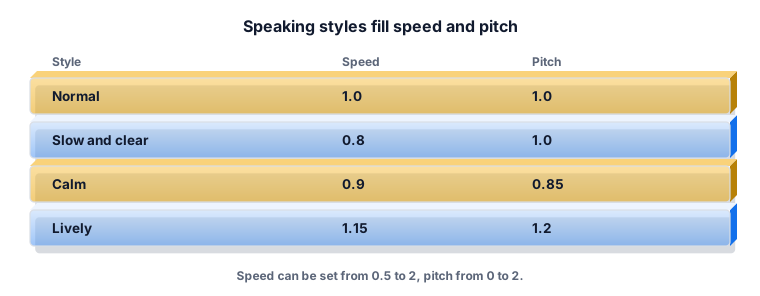
A table of four speaking styles with their speed and pitch values
Speaking styles fill speed and pitch.

Why long text is read in pieces

Some browsers stop a single long utterance after about 15 seconds. The tool splits the text at sentence ends into pieces of up to about 180 characters and queues them, so a long article plays to the end.
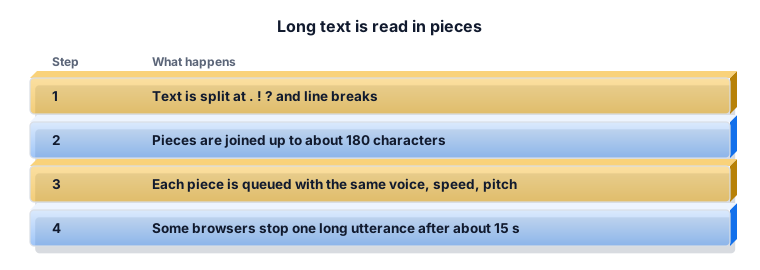
Four steps explaining how long text is split into pieces and queued
Long text is read in pieces.

Worked example 1: proofreading by ear

Paste your essay, choose Slow and clear and follow the text. Every time the voice trips, mark the sentence. Missing words and repeated words are easy to hear.

Worked example 2: listening to an article

A 2,400-word article at speed 1.25 takes roughly 2,400 ÷ (150 × 1.25) ≈ 13 minutes. This is an estimate; voices differ.

Worked example 3: another language

For Arabic or Urdu text, pick a voice whose language matches. If none is listed, your device has no voice for that language; add one in the system settings.

What the ZYSNOR Text to Speech does

  • Uses your browser's voices; nothing is recorded or uploaded by ZYSNOR.
  • Speed 0.5 to 2, pitch 0 to 2, four styles, voice filter by type and accent.
  • Pause, resume and stop.

Practice problems

Problem 1. Why does the voice list differ on your phone and laptop?

Show the worked answer

The voices come from each device and browser, so each has its own set.

Problem 2. About how long is a 900-word text at speed 1.5?

Show the worked answer

900 ÷ (150 × 1.5) = about 4 minutes (estimate).

Ready to try it? The free tool works in your browser, and the button in the page header takes you straight to it.

Common questions

Is text to speech free here?

Yes, with no account. It uses the voices already on your device.

Why are there no voices for my language?

Your device has none installed. Add a voice or language pack in the system settings and reload.

Does it need the internet?

It depends on the voice. Some run on the device and others use an online service.

Why did it stop on long text in other tools?

Some browsers stop one long utterance after about 15 seconds. This tool reads short pieces in a row.

Can I download the audio?

No. Browsers do not give web pages the audio from built-in voices.

Is my text sent to ZYSNOR?

No. The browser speaks it; an online voice may send the text to the voice provider.

Sources and how we researched this

Sources (2)

How we researched this

Behaviour was read from the tool's code: speech synthesis from the browser, pieces of up to about 180 characters, speed 0.5 to 2, pitch 0 to 2, four speaking styles, voice list filtered by type and accent. Playback itself could not be heard in our headless test browser, so voice quality was not measured. MDN documents that getVoices() returns the voices available on the current device; a voice's localService flag says whether it runs locally or through a remote service. The 150 words per minute figure is an estimate, not a measurement. Spotted something that does not match your experience? Tell us through the Contact page and we will check it and update this guide.

Related guides

Rules differ between schools and change over time. Always check your own school or university handbook.