

A report, a scanned book or a merged set of documents needs page numbers, but the cover must stay clean, or the front matter needs roman numerals, or the numbering must match what the style guide says. This guide explains what page numbering means, how the ZYSNOR tool counts, and how to get exactly the numbers you want, with worked examples measured on the tool.
What a page number is, and where the idea comes from
A page number is a label printed on a page. It is separate from the page's position in the file: a PDF viewer shows "page 3 of 10" by counting pages from the start, whatever is printed on them. Adding numbers to a PDF therefore means drawing text on the pages; it does not change the order or the count.
Printed books number their pages in two runs. The Chicago Manual of Style calls for lower-case roman numerals (i, ii, iii) for the front matter and arabic numerals (1, 2, 3) from the first page of the text. Chicago's own Q&A explains why the habit survives: pages are often added or dropped after typesetting (a dedication, a preface that arrives late), and a separate roman run for the front matter means the main text does not have to be renumbered. Blind pages such as a title page carry a number that is counted but not printed.
Where the number goes and what it looks like
The ZYSNOR tool offers six positions: top or bottom, each at the left, centre or right. The formats are 1, 2, 3; Page 1; Page 1 of 10; 1 / 10; - 1 -; and lower-case or capital roman numerals. The size can be small, medium or large.
| Style | Position | Title or cover page |
|---|---|---|
| APA 7th edition (student and professional papers) | Top right, every page | Carries page number 1 and shows it |
| Chicago and Turabian (student paper) | Footer or header, centre or right | Counted but not shown; the body starts at page 2 (or the title page counts as i if the front matter uses roman numerals) |
Your school's own handbook can differ from both. Check it before you print.
How the ZYSNOR tool counts
Three settings decide the numbers. Skip the first pages leaves that many pages from the start without a number. Only these pages is a page list such as 2-5, odd, even or last; leave it empty for every page. Start numbering at is the number the first numbered page shows. The next numbered page shows one more, and so on. A skipped page or a page outside your list is not counted.
Worked example 1: the simple case
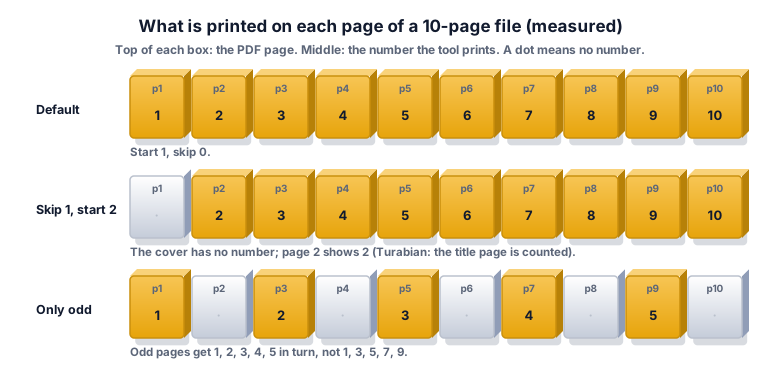
A 10-page file with nothing changed (start 1, skip 0, format 1, 2, 3, bottom centre). Page 1 shows 1 and page 10 shows 10. We measured exactly this on the tool. The same file in the format 1 / 10 prints 1 / 10, 2 / 10 and so on up to 10 / 10.
Worked example 2: leave the cover blank
You want no number on the cover, but the following page should read 2, because the cover counts as page 1 (the Turabian rule). Set Skip the first pages = 1 and Start numbering at = 2. Page 1 stays blank, page 2 shows 2 and page 10 shows 10. Check: the number printed on every page now equals its place in the file.
If you set only the skip and leave the start at 1, page 2 of the file shows 1. That is right for a report whose body should start at 1 after a cover that is not counted, and wrong if you wanted the printed number to match the page's place in the file. Decide which you need before you press the button.
Worked example 3: a common mistake with Page n of m
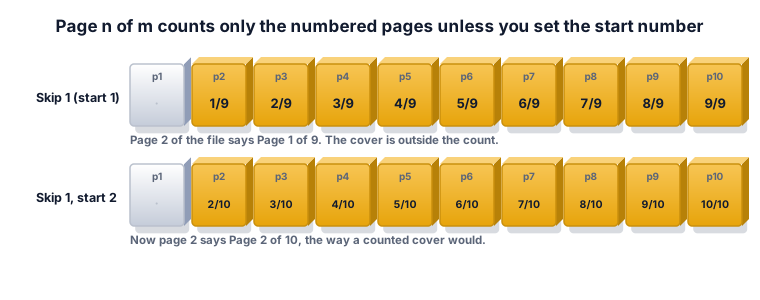
You skip the cover and choose Page 1 of 10. The result on a 10-page file reads Page 1 of 9 on file page 2, up to Page 9 of 9 on file page 10. The total is the count of numbered pages (9), because the cover is outside the count. If you wanted Page 2 of 10 on file page 2, also set the start number to 2: the tool then prints Page 2 of 10 up to Page 10 of 10.
Worked example 4: number only some pages
Type odd in Only these pages on a 10-page file. The pages 1, 3, 5, 7 and 9 are numbered, and they show 1, 2, 3, 4 and 5 (measured). The tool numbers the pages you picked in order; it does not copy the file's page number onto them. If you want the number to equal the file page (1, 3, 5, 7, 9), number every page instead and cover the others, or number each page group in a separate run.
Worked example 5: roman numerals, then 1, 2, 3
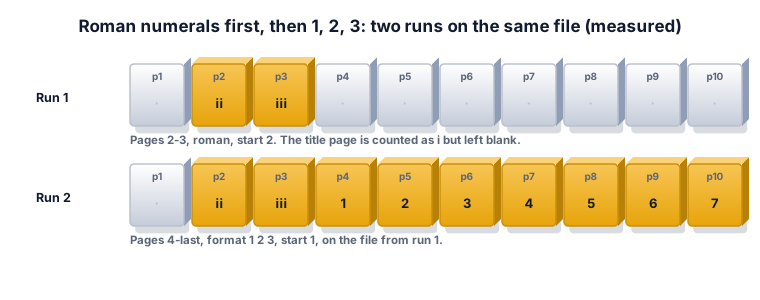
A thesis has a title page (i, not shown), a dedication (ii), contents (iii) and then the body that must start at 1. The tool uses one format per run, so do two runs on the same file. Run 1: Only these pages 2-3, format i, ii, iii, start 2: pages 2 and 3 show ii and iii. Run 2 on the result: Only these pages 4-last, format 1, 2, 3, start 1. We measured both runs on a 10-page file: the final file shows ii, iii on pages 2 and 3, and 1 to 7 on pages 4 to 10.
With capital roman numerals the same idea applies: starting at 4 on pages 1 to 3 gives IV, V and VI.
Rules by style
- APA 7: the page header sits in the top margin of every page. For student papers it holds only the page number, at the top right, and the title page carries number 1. In the tool: position top right, start 1, skip 0.
- Chicago and Turabian: do not print a number on the title page, but count it. If the paper has no roman front matter, the first page of text is page 2; if it does, the title page counts as i. Numbers may sit centred or right, in the header or footer. In the tool: skip 1, start 2, bottom centre.
- Your school: handbooks and templates may ask for different positions or for "Page n of m". Follow them first.
What the ZYSNOR Number PDF Pages tool actually does
The tool runs in your browser, so the file is not uploaded. The PDF engine is loaded when you open the page, so you need an internet connection to start; after that the file is processed on your device.
- Numbers are drawn as text with a standard font, in dark grey, at a fixed distance from the page edge. They go on scanned pages as well.
- One format and one start number per run; use two runs for mixed numbering.
- Limits: the PDF must not be password-protected, and up to 20 files or 100 MB in total are accepted per run.
- Your original file is never changed; you download a new copy.
Mistakes that waste time
- Skipping the cover but leaving the start at 1. The first numbered page then shows 1, not its place in the file.
- Expecting the total in Page n of m to be the file's page count. It is the last number that will be printed (see example 3).
- Expecting odd to print 1, 3, 5. It prints 1, 2, 3 on the odd pages.
- Numbering before the document is final. If you merge or remove pages afterwards the numbers no longer match. Merge, split or delete first, number last.
- Not checking the result. Open the new file and read the first numbered page, a middle page and the last page.
Other ways to do it
- Word processors: insert page numbers in the header or footer before you export to PDF. This is the best way for a document you still edit, because the numbers update when the text changes.
- ZYSNOR: best for finished PDFs and scans, free and with no sign-up; the file stays on your device.
Words you may meet
- Front matter: the pages before the main text, such as title page, dedication and contents.
- Folio: a page number, or the page it is printed on.
- Blind folio: a counted page that shows no number, such as a title page.
- Roman numerals: i, ii, iii, iv ... for front matter; capital letters I, II, III are the capital form.
- Header and footer: the strips in the top and bottom margin of a page.
- Start number: the number shown on the first page that is numbered.
Check your answer in 10 seconds
- Does the first numbered page show the number you planned?
- Is the cover really blank?
- For Page n of m: does the total equal the last number printed?
- Is the number in the position and style your handbook asks for?
Practice problems
Problem 1. A 24-page report: skip 2 pages, start 3. What does page 3 and page 24 show?
Show the worked answer
Pages 1 and 2 have no number. Page 3 is the first numbered page and shows the start number, 3. Each later page adds one, so page 24 is the 22nd numbered page and shows 3 + 21 = 24.
Problem 2. A 12-page file, skip 1, start 1, format Page n of m. What is printed on the last page?
Show the worked answer
11 pages are numbered (pages 2 to 12). The last shows Page 11 of 11. With start 2 it would read Page 12 of 12.
Problem 3. You type even on a 10-page file with start 1. What numbers are printed, and on which pages?
Show the worked answer
Even pages 2, 4, 6, 8 and 10 are numbered, and they show 1, 2, 3, 4, 5 in turn: page 2 shows 1, page 4 shows 2, and page 10 shows 5.
Ready to try it on your own file? The free Number PDF Pages tool does the work in your browser, and the button in the page header takes you straight to it.