

You need one page of a PDF as a picture for a slide, a chat message, a website or a form that only accepts images. This guide explains what the quality settings mean in pixels, how big the files get, when to pick JPG or PNG, and how to get only the pages you need.
What the conversion does
A PDF stores text and lines as instructions, so it stays sharp at any zoom. An image is a fixed grid of pixels. Converting draws each page once onto a grid of a chosen size and saves that grid as a JPG or PNG. After that, zooming in will not add detail, so choose the size before you convert.
The quality settings in pixels
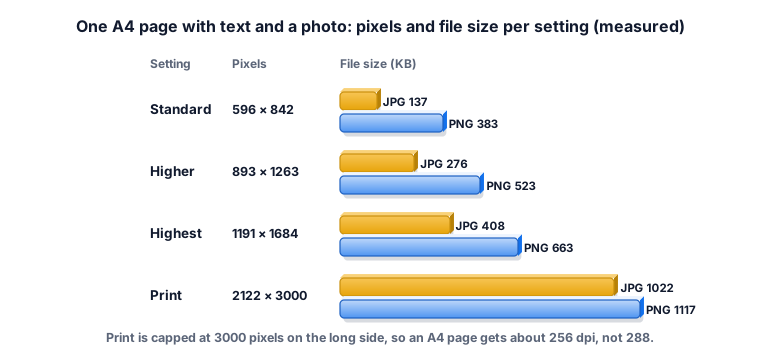
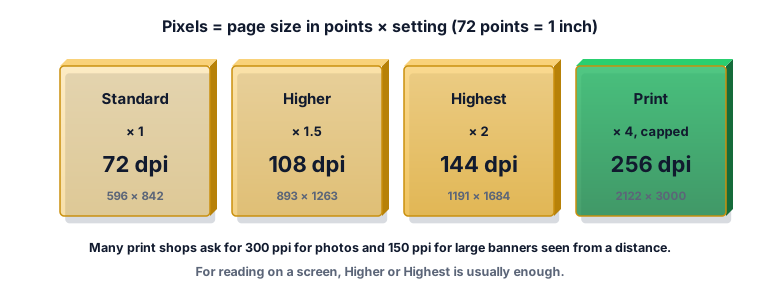
The setting multiplies the page size. For an A4 page we measured 596 × 842 pixels at Standard, 893 × 1263 at Higher, 1191 × 1684 at Highest and 2122 × 3000 at Print. Print stops at 3000 pixels on the long side, so an A4 page gets about 256 dpi rather than the 288 that × 4 would give. A US Letter page (612 × 792 points) is also capped at Print.
JPG or PNG
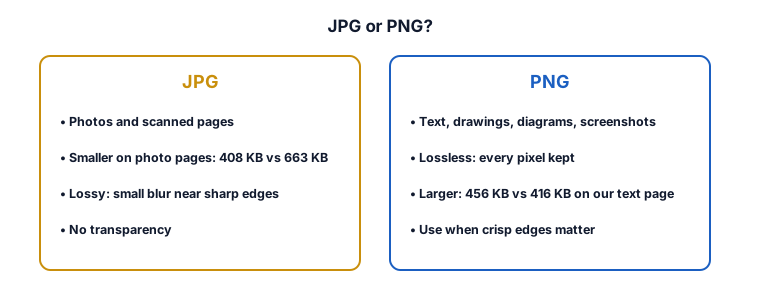
JPEG uses lossy compression, which makes files smaller but can lower quality, while PNG is lossless and keeps every pixel at the cost of larger files. Only PNG supports transparency. On our photo page at Highest, JPG was 408 KB and PNG 663 KB. On our dense text page the two were close: JPG 416 KB and PNG 456 KB. The real difference on text is sharpness: JPG can leave a faint blur around letters, PNG does not. Pick JPG for photos and scans, PNG for text, drawings, charts and screenshots.
How much resolution you need
For a screen, Higher or Highest is enough: a 1191-pixel-wide image already fills most laptop windows. For printing, print shops usually ask for at least 300 dpi, and 150 dpi for large banners. Print gives about 256 dpi on A4, which is fine for office printing of text pages. If a print shop asks for exactly 300 dpi, export from the program that made the PDF instead.
Worked example 1: one page for a slide
You want page 3 of a report on a slide. Type 3 in Pages, use PDF to PNG (the page is mostly text and a chart) and choose Highest. You get one file, page-3.png, 1191 pixels wide for an A4 page, which is sharp on a projector.
Worked example 2: a scanned form for an upload portal
A portal asks for a JPG of a 2-page scanned form. Use PDF to JPG, leave Pages empty and choose Higher. You get page-1.jpg and page-2.jpg and a ZIP with both. If the portal has a size limit in KB, use the photo size guide afterwards rather than going down to Standard, which can make small print hard to read.
Worked example 3: the last page only
Type last. On our 3-page file the tool gave one image named page-3.jpg. The file name always uses the page number in the original PDF, so you can tell which page it came from. odd gave page-1.jpg, page-3.jpg and a ZIP.
Worked example 4: estimating the size of a batch
You convert a 20-page photo-heavy brochure to JPG at Highest. Our photo page was about 408 KB, so expect very roughly 20 × 0.4 MB = 8 MB, more if the pages are full-bleed photos. This is an estimate: text-only pages can be similar or smaller, and busy photos larger.
Worked example 5: a page that does not exist
Typing 9 on a 3-page file gives "None of those pages exist. This PDF has 3 pages." Check the page number in your PDF viewer, which counts PDF pages, not the numbers printed on the pages.
What the ZYSNOR tools do
PDF to JPG and PDF to PNG run in your browser, so the file is not uploaded. The PDF engine is loaded when you open the page, so you need an internet connection to start; after that the file is processed on your device.
- Quality: Standard (× 1, 72 dpi), Higher (× 1.5, 108 dpi), Highest (× 2, 144 dpi), Print (× 4, capped at 3000 pixels on the long side).
- Pages: empty for every page, or a list such as 1-3, 5, odd, even or last.
- Output: one file per page named page-N, plus a ZIP when there is more than one page. JPG pages have a white background.
- Limits: up to 30 pages and 50 MB per PDF; password-protected PDFs are refused.
Mistakes that waste time
- Converting at Standard and zooming in later. Pixels cannot be added afterwards. Convert at the size you need.
- Using JPG for a page of small text. PNG keeps letters crisp.
- Expecting copyable text. The image has no text layer. Use the original PDF or an OCR tool to copy words.
- Converting all pages when you need one. Use the Pages box.
Other ways to do it
- A screenshot is quick but takes only what fits on screen, at screen resolution.
- Desktop PDF apps can export pages as images, often with an exact dpi setting.
- ZYSNOR: free, no sign-up, and the file stays on your device.
Words you may meet
- Point: 1/72 of an inch, the unit of PDF page sizes.
- dpi / ppi: dots or pixels per inch, how densely the pixels sit on paper.
- Lossy / lossless: compression that throws some detail away / keeps every pixel.
- Render: draw the page into pixels.
Check your answer in 10 seconds
- Is the image wide enough for where it goes (about 1200 pixels for a full slide)?
- Is small text readable when you zoom to 100%?
- Did you get only the pages you named?
Practice problems
Problem 1. A US Letter page (612 × 792 points) at Highest. How many pixels?
Show the worked answer
612 × 2 = 1224 and 792 × 2 = 1584, so 1224 × 1584 pixels (144 dpi).
Problem 2. The same Letter page at Print. What size, and why?
Show the worked answer
× 4 would give 3168 pixels tall, above the 3000 cap. The tool scales to 3000 / 792 = 3.79, so about 2318 × 3000 pixels, roughly 273 dpi.
Problem 3. You type 2-3, last on a 5-page PDF. Which files do you get?
Show the worked answer
Pages 2, 3 and 5: page-2, page-3 and page-5, plus a ZIP with all three.
Ready to try it on your own file? The free PDF to JPG tool does the work in your browser, and the button in the page header takes you straight to it. For sharp text pages use PDF to PNG.