

Glossary · CAD and BIM
What is IFC (Industry Foundation Classes)? Meaning, Example and How It Works
In simple words
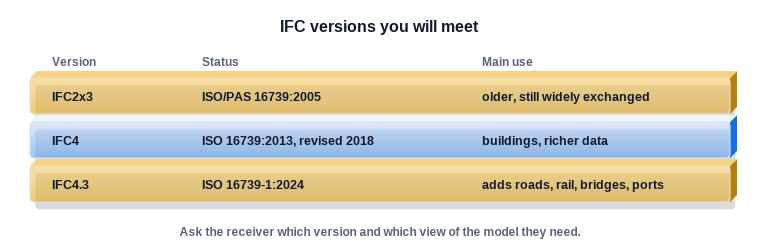
IFC (Industry Foundation Classes) is an open, vendor-neutral data standard for describing buildings and infrastructure, so models can be shared between different BIM software. It is developed by buildingSMART International and published as ISO 16739-1. Files usually have the extension .ifc.
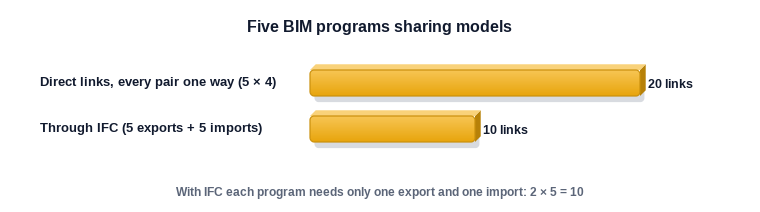
Without a common format, each pair of programs would need its own translator. With IFC, each program only needs to export and import one open format.
How it works
IFC is a data schema: it defines classes for building and infrastructure objects (IfcWall, IfcDoor, IfcSlab, IfcBeam and many more), how they relate to each other, and how their properties are stored in property sets. A BIM program exports its model by mapping its own elements to these classes. The usual file is a text file in the STEP format with the extension .ifc; ifcXML and compressed ifcZIP also exist.
How an IFC model is organised
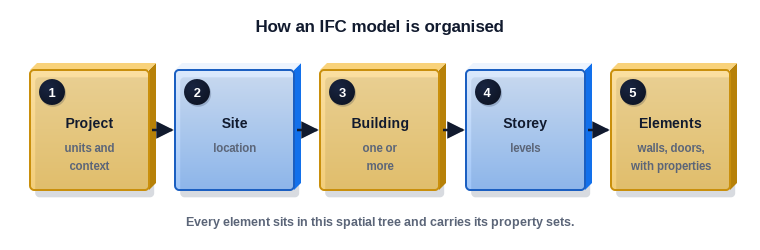
Each element sits in a spatial tree from project down to storey, and carries its type, its geometry and property sets such as Pset_WallCommon. Quantities, such as a wall's length, height and net side area, can be exported in quantity sets.
Versions
Worked example: why one open format saves work
Five teams use five different BIM programs and all need to share models.
- Direct translators, one for every ordered pair: 5 × 4 = 20.
- Through IFC, each program needs one export and one import: 5 + 5 = 10.
- Add a sixth program: direct translators rise to 6 × 5 = 30, through IFC each needs one export and one import, so 6 + 6 = 12.
Model views
An IFC export can carry everything in the schema or only what a task needs. A model view definition (MVD) is an agreed subset, such as the Coordination View for IFC2x3 or the Reference View for IFC4, so the sender and receiver expect the same content.
Step by step: a clean IFC export
- Agree the IFC version and model view with the receiver.
- Check that elements use the right categories (a floor modelled as a floor, not as a wall).
- Set the export options: storeys, property sets, quantities and the coordinate base.
- Export, then open the file in an independent IFC viewer.
- Spot-check a few elements: class, storey, properties and position.
Common mistakes
- Expecting a perfect round trip: IFC is best for reference and coordination, not for editing back and forth.
- Exporting the wrong version or model view for the receiving software.
- Elements mapped to the wrong class, such as a beam exported as a generic proxy object.
- Models on different coordinates, so they do not line up when combined.
- No property sets or quantities exported, so the receiver gets shapes without data.
Related terms
- CAD and BIMGlossary term
Building Information Modeling (BIM)
Building Information Modeling (BIM) is a way of designing, building and running a building with one shared digital model. The model holds the 3D shape and the information about every element, such as type, material, size and cost.1 min read · Added 20 Nov 2026 - CAD and BIMGlossary term
Level of Development (LOD)
Level of Development (LOD) tells you how complete and reliable an element in a BIM model is, so others know how far they can trust it. The common scale runs LOD 100, 200, 300, 350, 400 and 500.2 min read · Added 20 Nov 2026 - CAD and BIMGlossary term
DWG file
DWG is the native drawing file format of AutoCAD. It stores 2D and 3D geometry, layers, blocks, text, dimensions, layouts and drawing information. It is owned by Autodesk and is one of the most widely used formats for sharing CAD drawings.1 min read · Added 20 Nov 2026 - CAD and BIMGlossary term
Clash detection
Clash detection is the BIM check that finds places where elements from different models run into each other, such as a duct passing through a beam, before anything is built. Fixing a clash on screen is far cheaper than on site.2 min read · Added 20 Nov 2026
Frequently asked questions
Can I edit an IFC file like a Revit file?
Usually you view, check and coordinate with it; full editing depends on the software.
Is IFC free to use?
Yes, the standard is open.