

Glossary · CAD and BIM
What is a Schedule in Revit? Quantities, Material Takeoff and Example
In simple words
A Revit schedule is a table view of the model that lists elements and their data, such as every door with its type, size and count. Because it reads the model directly, it updates whenever the model changes.
A schedule is not a separate spreadsheet. It is another view of the same model, like a plan or a section, so editing a value in the schedule also changes the element in the model.
How it works
You choose a category (for example Walls), then the fields to show as columns. Revit lists one row per element, or groups rows by a field such as Type and adds totals. Filters keep only the rows you need, and calculated values can add your own formulas, such as an area multiplied by a rate.
Setting up a schedule
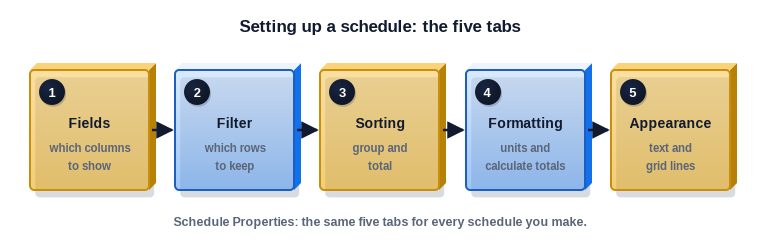
- Fields: the parameters shown as columns, such as Type, Length, Area and Count.
- Filter: conditions that keep or hide rows, such as Level equals Level 1.
- Sorting/Grouping: order and group the rows, with headers, footers and grand totals. Untick "Itemize every instance" to show one row per group.
- Formatting: units, alignment and "Calculate totals" for numeric fields.
- Appearance: text, grid lines and the look on a sheet.
Kinds of schedule
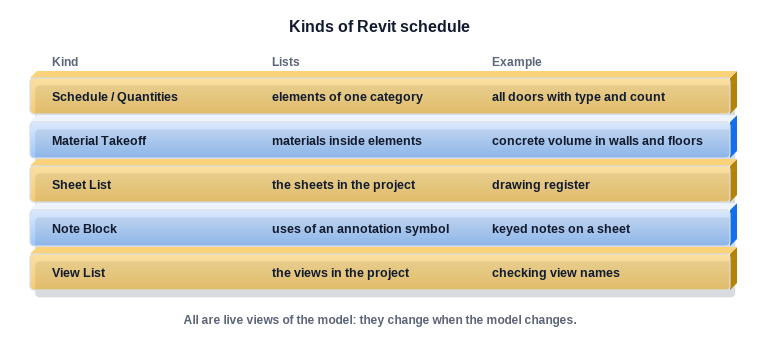
A Material Takeoff is the one quantity surveyors use most after the ordinary schedule: it reads the materials inside elements, so the concrete in walls, floors and columns can be listed together by volume.
Worked example: a wall schedule updates itself
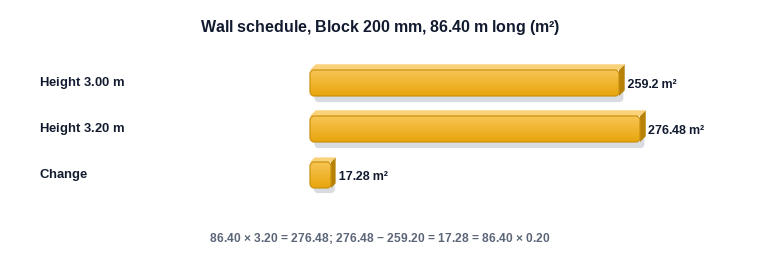
A schedule grouped by type shows a run of solid Block 200 mm walls with lengths of 30.00, 26.40 and 30.00 m, all 3.00 m high and without openings.
- Total length: 30.00 + 26.40 + 30.00 = 86.40 m
- Area: 86.40 × 3.00 = 259.20 m²
- The walls are changed to 3.20 m high: 86.40 × 3.20 = 276.48 m²
- Change: 276.48 − 259.20 = 17.28 m², which equals 86.40 × 0.20
From schedule to Excel
Export a schedule from File > Export > Reports > Schedule as delimited text, which Excel opens. The export is a snapshot: re-export it after the model changes.
Step by step: a door schedule
- View tab > Schedules > Schedule/Quantities, and pick the Doors category.
- Add the fields Type, Width, Height, Level and Count.
- Sort by Type, tick Footer with count, and untick "Itemize every instance".
- Add a filter if only one level or phase is needed.
- Check the totals against the model, then place the schedule on a sheet or export it.
Common mistakes
- Trusting model quantities without checking the measurement rules the BOQ follows; Revit does not apply NRM or POMI deductions for you.
- Filters or phases that hide elements you meant to include.
- Elements modelled in the wrong category, so they never reach the schedule.
- Comparing an exported text file from last week with the live model.
- Material takeoff volumes that differ slightly from element volumes where walls have sweeps, reveals or special joins.
Related terms
- CAD and BIMGlossary term
Revit family
A Revit family is a group of elements that share the same parameters and graphics, such as all single-flush doors. Each family can have several types (sizes), and every placed copy is an instance of one type.2 min read · Added 20 Nov 2026 - CAD and BIMGlossary term
Building Information Modeling (BIM)
Building Information Modeling (BIM) is a way of designing, building and running a building with one shared digital model. The model holds the 3D shape and the information about every element, such as type, material, size and cost.1 min read · Added 20 Nov 2026 - Construction and QSGlossary term
Quantity takeoff (QTO)
Quantity takeoff (QTO, also "taking off") is the process of measuring quantities, such as areas, lengths, volumes and counts, from drawings, models and specifications, mainly to work out construction cost. The word "takeoff" is also used for the list of quantities the process produces.2 min read · Added 20 Nov 2026 - Construction and QSGlossary term
Bill of Quantities (BOQ)
A Bill of Quantities (BOQ) is a document that lists every item of work in a construction project with a description, a unit and a measured quantity. Contractors price each line, so every bidder prices exactly the same work.2 min read · Added 20 Nov 2026
Frequently asked questions
How do I export a schedule to Excel?
Export it as delimited text (File > Export > Reports > Schedule) and open it in Excel.
What is a material takeoff?
A schedule that lists the materials of elements, with their areas and volumes.